ConvertReference.org

Css Pixel to Inch and Inch to Css Pixel Converter (px to in, in to px)

px

Review And Reference Information

Verified by the ConvertReference Technical Standards Team

ConvertReference Technical Standards Team

All values and formulas are validated through our editorial review process and cross-checked against internationally recognized reference standards (NIST, BIPM, CODATA).

View Editorial Standards & Report Corrections

Last reviewed: December 01, 2025

Conversion Factors

1 css pixel = 0.0104166666666667 inch
1 inch = 96 css pixel

(Exact factors: 0.0104166666666667 and 96)

Sources: NIST · BIPM

About This Css Pixel And Inch Converter

Welcome to the CSS Pixel to Inch converter. Enter a value in CSS pixels to view the result. Use the swap button to switch between CSS pixels and inches. See the result displayed on the page.

What Are Css Pixels And Inches?

What Is A Css Pixel?

CSS pixel (px) is a screen-length unit used in CSS. It is defined as 1/96 of an inch (1 in = 96 px; 1 px = 0.0104167 in). It is a device-independent unit in CSS, not tied to a physical device pixel. System: CSS length units. Abbreviation: px. Real-world example: a 16px font is about 0.167 inches tall on screen (roughly 4.2 mm).

What Is An Inch?

An inch (in) is a unit of length in the Imperial and US customary systems. It is defined as exactly 1/12 of a foot and equals 2.54 centimeters. Its symbol is in. Real-world scale: a standard paperclip is about 1 inch long.

When To Use Css Pixel Vs Inch

Css Pixel Usage

CSS pixel is the fundamental unit for CSS layouts, describing lengths for elements, typography, and spacing in web pages and apps across browsers and devices. It adapts with zoom and device pixel ratio to keep sizing consistent on screens. Primary usage countries include United States, United Kingdom, Germany, and Japan.

Inch Usage

An inch is used primarily in the United States, the United Kingdom, Canada, and Australia for everyday measurements and consumer products, coexisting with metric units in many contexts.

How To Convert Between Css Pixels And Inches

Conversion Formulas

Css Pixel to Inch:
css pixel × 0.0104166666666667 = inch

Inch to Css Pixel:
inch × 96 = css pixel

Step-by-Step Guide

Css Pixel to Inch

  1. Take your value in css pixels.
  2. Multiply by 0.0104166666666667.
  3. The result is in inches.

Inch to Css Pixel

  1. Take your value in inches.
  2. Multiply by 96.
  3. The result is in css pixels.

Example: Convert 70 css pixels to inches.

  • Exact: 70 × 0.0104166666666667 = 0.729166666666667 inches.
  • Rounded: approximately 0.729167 inches.

Example: Convert 5 inches to css pixels.

  • Exact: 5 × 96 = 480 css pixels.

History & Context

CSS introduced pixels and inches as units to make web layouts predictable across devices. The CSS pixel is a reference length meant to stay readable when users zoom or when displays differ in sharpness, so authors can rely on a stable visual size. The inch unit in CSS aimed to map to a physical inch on a device, but browsers determine it through the current zoom level and screen density, so it behaves differently from a real ruler on screen. In practice this history moved from rigid device pixels toward device independent sizing, helping design adapt to new screens. Designers now rely on flexible units and testing as browsers and devices vary.

Practical Use

Web designers often need to convert CSS pixels to inches to verify how a webpage will print, since physical paper size is measured in inches and print layouts depend on real-world dimensions. When preparing printable invoices or reports, determining the inch size from CSS pixels helps ensure exact margins and font sizes on paper. Conversely, for translating a physical mockup back into on-screen design, developers might convert inches to CSS pixels to map real-world measurements to the digital layout so the final result matches the intended size.

Common Mistakes When Converting Between Css Pixels And Inches

  • Assuming CSS pixels have a fixed physical size in inches on all displays.
  • Treating CSS pixels as if they map directly to inches without considering device pixel ratio.
  • Ignoring how browser zoom changes the effective size of CSS pixels relative to inches.
  • Mistaking the total display resolution for the size of a single CSS pixel.

Mental Shortcuts For Quick Conversions

Tip 1 (px to inch): 96 CSS pixels ≈ 1 inch. Tip 2 (inch to px): 1 inch ≈ 96 CSS pixels. Note: This is for estimation only; use a precise converter for most situations.

Css Pixels And Inches Conversion Graph
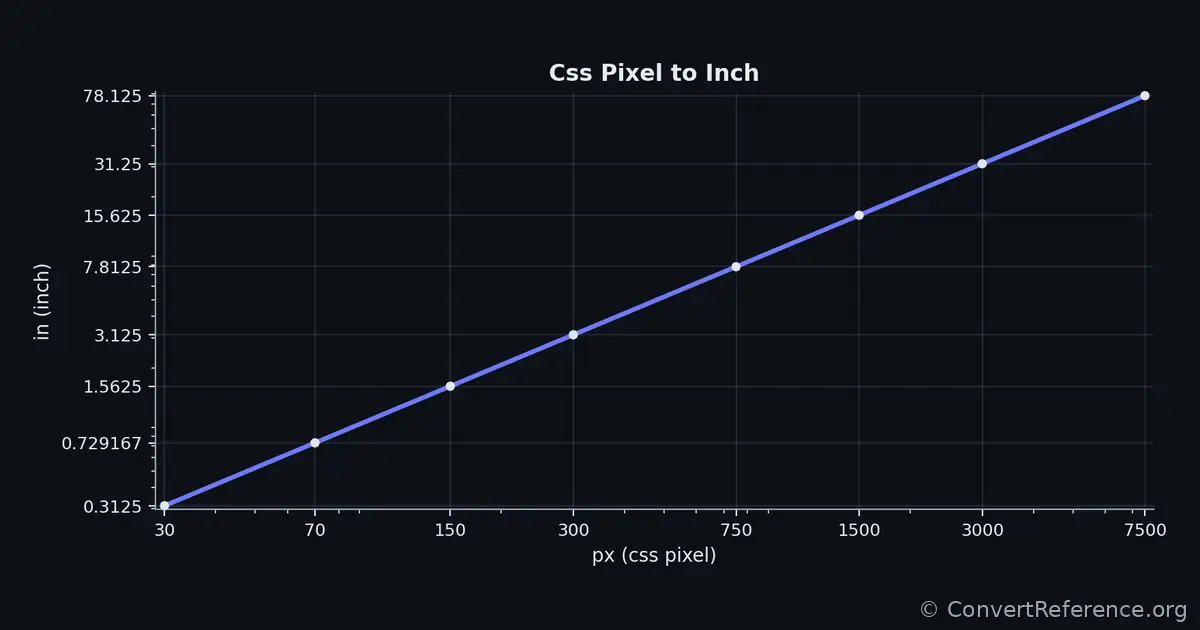
Css pixels and Inches Conversion Graph
Conversion graph showing the relationship between css pixels and inches.

Conversion Table For CSS Pixels And Inches

Common conversion values
Css pixels Inches
300.3125
700.729167
1501.5625
3003.125
7507.8125
150015.625
300031.25
750078.125

Values are rounded for display; internal calculations use the exact conversion factors between CSS Pixels and inches (0.0104166666666667 and 96).

Dataset & API Access

Programmatic Access

Free JSON API with stable endpoints and predictable keys for automated bidirectional conversions.

Endpoint: https://convertreference.org/api/v1/convert/css-pixel-to-inch.json

Content Type: application/json

Documentation: View API docs

Licensing

License: CC0 1.0 Universal (Public Domain)

See all datasets

Data & Editorial Process

All numerical values and formulas are generated from the Pint scientific unit library (v0.25), using constants consistent with the BIPM SI Brochure (9th Edition) and NIST Special Publication 811. Explanatory text is drafted with AI assistance and reviewed by ConvertReference editors for clarity and accuracy. This converter is completely free to use, and all calculations are performed locally in your browser and never sent to a server.

  • 2025-12-01 – Generated: Page created using Pint v0.25 verified constants.
  • 2025-12-01 – Reviewed: Verified by ConvertReference editors; no numerical changes required.