ConvertReference.org

Css Pixel to Centimeter and Centimeter to Css Pixel Converter (px to cm, cm to px)

px

Review And Reference Information

Verified by the ConvertReference Technical Standards Team

ConvertReference Technical Standards Team

All values and formulas are validated through our editorial review process and cross-checked against internationally recognized reference standards (NIST, BIPM, CODATA).

View Editorial Standards & Report Corrections

Last reviewed: December 01, 2025

Conversion Factors

1 css pixel = 0.0264583333333333 centimeter
1 centimeter = 37.7952755905512 css pixel

(Exact factors: 0.0264583333333333 and 37.7952755905512)

Sources: NIST · BIPM

About This Css Pixel And Centimeter Converter

This handy tool lets you switch between CSS pixels and centimeters with ease. Enter a value in CSS pixels and see the result in the other unit. Use the swap button to toggle between units. Fast, clear results help you plan layouts with confidence.

What Are Css Pixels And Centimeters?

What Is A Css Pixel?

A CSS pixel (px) is a length unit used in web pages. It is defined as 1/96 of an inch in the CSS reference pixel model (so 1 inch = 96 px). System: CSS length units. Symbol: px. Example: a 12 px font is about 0.125 inches tall (≈3.2 mm); a 24 px element is about 0.25 inches wide.

What Is A Centimeter?

Centimeter: a unit of length in the metric system. It is one hundredth of a meter (1 cm = 0.01 m). It belongs to the International System of Units (SI). The usual symbol is cm. Real-world example: a standard credit card is about 8.5 cm wide, and a pencil is roughly 7 cm long.

When To Use Css Pixel Vs Centimeter

Css Pixel Usage

CSS pixels are the standard length unit in CSS used for font sizes, spacing, and layout in web pages. They map to a device-independent unit in browsers, maintaining consistency across screen resolutions. Primary users include United States, United Kingdom, Canada, and Australia.

Centimeter Usage

Centimeters are used in most metric-using countries for everyday length measurements. Examples include Brazil, India, Japan, and Canada.

How To Convert Between Css Pixels And Centimeters

Conversion Formulas

Css Pixel to Centimeter:
css pixel × 0.0264583333333333 = centimeter

Centimeter to Css Pixel:
centimeter × 37.7952755905512 = css pixel

Step-by-Step Guide

Css Pixel to Centimeter

  1. Take your value in css pixels.
  2. Multiply by 0.0264583333333333.
  3. The result is in centimeters.

Centimeter to Css Pixel

  1. Take your value in centimeters.
  2. Multiply by 37.7952755905512.
  3. The result is in css pixels.

Example: Convert 20 css pixels to centimeters.

  • Exact: 20 × 0.0264583333333333 = 0.529166666666667 centimeters.
  • Rounded: approximately 0.529167 centimeters.

Example: Convert 5 centimeters to css pixels.

  • Exact: 5 × 37.7952755905512 = 188.976377952756 css pixels.
  • Rounded: approximately 188.976 css pixels.

History & Context

CSS pixel arose as a way to give web pages a stable length that would look similar across computers and devices. In early browsers pages used the screen's own pixels, which varied widely, making layouts brittle. The CSS working groups defined a flexible unit called the CSS pixel that stands apart from device pixels and helps pages scale with zoom and density. The centimeter is another CSS unit that represents a real world length, intended to relate to physical size when printing and to give designers a way to express fixed proportions on screen. Over time, the rules around these units were refined for consistency between print and screen, aiding predictable sizing across devices.

Practical Use

Web designers often need to know how large a CSS element will print, so they convert CSS pixels to centimeters for the paper version. For example, a 150 CSS pixel-wide button is about 3.97 cm wide (1 CSS px ≈ 0.02646 cm). Conversely, when scaling printed measurements back to the web, they convert centimeters to CSS pixels to keep margins and sizes consistent, such as turning a 2 cm margin into roughly 76 CSS pixels. This helps ensure the digital layout aligns with physical measurements across devices and printers.

Common Mistakes When Converting Between Css Pixels And Centimeters

  • Assuming CSS pixels have a fixed physical size on all devices.
  • Assuming centimeters map directly to CSS pixels.
  • Ignoring that browser zoom alters the size of CSS pixels.
  • Overlooking varying device pixel densities across devices.

Mental Shortcuts For Quick Conversions

Tip 1 (CSS px → cm): 1 cm ≈ 38 CSS px, so cm ≈ px ÷ 38. Estimation only; for precise results, use a proper converter. Tip 2 (cm → CSS px): 1 CSS px ≈ 0.026 cm, so px ≈ cm ÷ 0.026. Estimation only; for accuracy, use a precise converter.

Css Pixels And Centimeters Conversion Graph
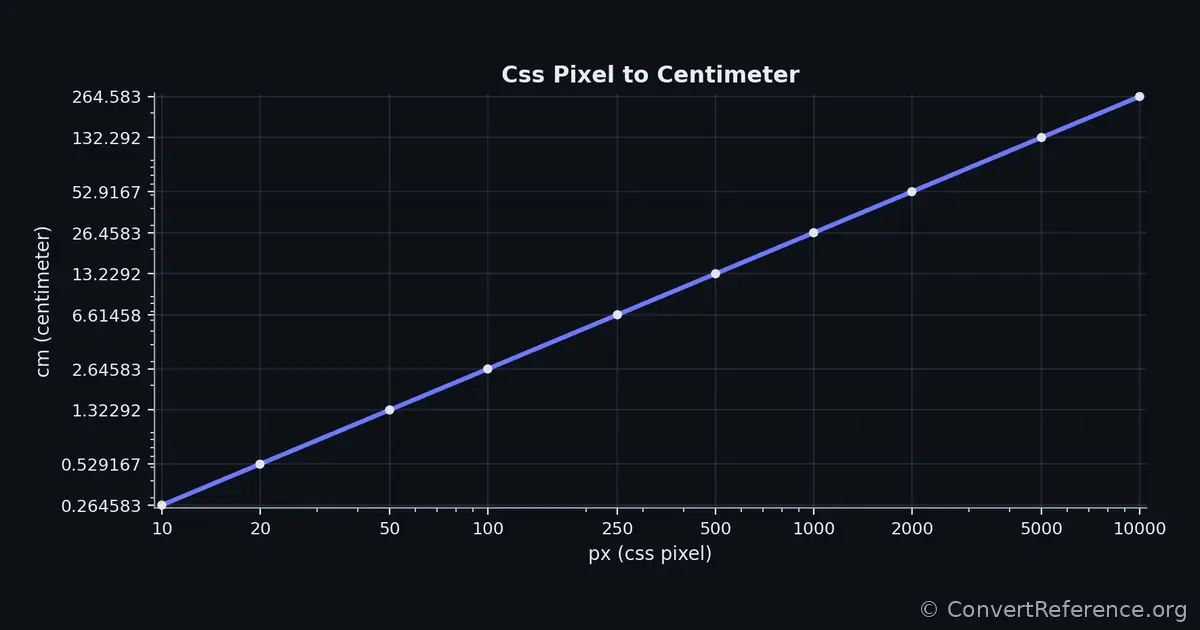
Css pixels and Centimeters Conversion Graph
Conversion graph showing the relationship between css pixels and centimeters.

Conversion Table For CSS Pixels And Centimeters

Common conversion values
Css pixels Centimeters
100.264583
200.529167
501.32292
1002.64583
2506.61458
50013.2292
100026.4583
200052.9167
5000132.292
10000264.583

Values are rounded for display; internal calculations use the exact conversion factors between CSS Pixels and centimeters (0.0264583333333333 and 37.7952755905512).

Dataset & API Access

Programmatic Access

Free JSON API with stable endpoints and predictable keys for automated bidirectional conversions.

Endpoint: https://convertreference.org/api/v1/convert/css-pixel-to-centimeter.json

Content Type: application/json

Documentation: View API docs

Licensing

License: CC0 1.0 Universal (Public Domain)

See all datasets

Data & Editorial Process

All numerical values and formulas are generated from the Pint scientific unit library (v0.25), using constants consistent with the BIPM SI Brochure (9th Edition) and NIST Special Publication 811. Explanatory text is drafted with AI assistance and reviewed by ConvertReference editors for clarity and accuracy. This converter is completely free to use, and all calculations are performed locally in your browser and never sent to a server.

  • 2025-12-01 – Generated: Page created using Pint v0.25 verified constants.
  • 2025-12-01 – Reviewed: Verified by ConvertReference editors; no numerical changes required.